---
title: "401(k) Loan Payroll Deductions: Repayments, Interest and Balances"
description: "Reconcile 401(k) loan deductions with principal, interest and plan postings. Separate repayments from contributions and check what changes after leave or a job change."
url: "https://blog.checkstubsonline.com/401k-loan-payroll-deductions"
datePublished: "2026-11-25"
---
# 401(k) Loan Payroll Deductions: Repayments, Interest and Balances
Reconcile 401(k) loan deductions with principal, interest and plan postings. Separate repayments from contributions and check what changes after leave or a job change.
Published: 2026-11-25
By [Check Stubs Online Editorial Team](https://blog.checkstubsonline.com/editorial-policy#editorial-team)
**A 401(k) loan deduction generally repays a participant loan; it is separate from a new retirement contribution.** Match the payroll amount to the plan’s posted payment, principal/interest allocation and remaining loan balance. If deductions stop after leave or a job change, obtain the actual repayment instructions promptly. A missed payment, a taxable deemed distribution and a plan loan offset are different events.
Reviewed November 25, 2026 · U.S. participant-loan and payroll records. Fictional principal, interest and tax figures are supplied for reconciliation, not a loan offer, personalized retirement recommendation or amortization quote. The plan’s terms and applicable tax requirements control.
A statement can show “401K” and “401K LOAN” beside each other while the retirement portal displays another total. The first task is to identify each transaction. Combining both payroll lines as new savings can overstate contributions; subtracting both principal and interest from the principal balance can understate the debt.
For traditional/Roth deferrals and employer matching, use the [401(k) contribution guide](https://blog.checkstubsonline.com/401k-on-pay-stub). This article follows money returning under a participant-loan agreement rather than a new salary-deferral election.
## In this guide
1. [Identify the loan and contribution codes](#loan-identify)
2. [Find the controlling repayment terms](#loan-terms)
3. [Reconcile principal and interest](#loan-ledger)
4. [Check the paycheck’s cash effect](#loan-paycheck)
5. [Trace a missing or changed posting](#loan-missing)
6. [Plan for leave or a job change](#loan-jobchange)
7. [Distinguish a default from an offset](#loan-distribution)
8. [Keep the right year-end evidence](#loan-records)
9. [401(k) repayment questions](#loan-faq)
## What does the deduction represent?
The [IRS participant-loan FAQ](https://www.irs.gov/retirement-plans/retirement-plans-faqs-regarding-loans) distinguishes loan repayments from plan contributions. Confirm the specific loan number and code with the employer and plan administrator. A retirement heading is a category, not proof that every amount counts toward the employee’s new elective deferrals.
**Different retirement entries need different supporting records**
| Entry | What it represents | Record to compare |
| --- | --- | --- |
| Traditional or Roth employee deferral | A new contribution under the employee’s election | Election and contribution history |
| Employer match or other contribution | Employer funding under the actual plan terms | Employer-source account record |
| Participant-loan payment | Principal and interest paid under a loan agreement | Loan repayment schedule and payment ledger |
| Loan fee | A separately identified charge if applicable | Fee disclosure and transaction detail |
| Loan offset or distribution entry | A change requiring its own plan/tax explanation | Distribution notice and relevant annual form |
Do not infer a contribution’s tax character from its abbreviated code. For a loan repayment, ask why it appears in the particular wage/deduction field. It should not be counted again as a new traditional deferral merely because payroll collects it. A loan payment also does not automatically generate the employer match that may accompany an eligible employee contribution.
## Which agreement controls the repayment?
Request the loan agreement, repayment schedule, payment frequency, interest allocation, outstanding principal and instructions for payments outside payroll. Also identify fees, treatment of extra payments, leave provisions and what happens when employment ends. An enrollment screen showing the original amount does not establish today’s principal balance.
The IRS FAQ describes optional plan lending with repayment requirements, ordinarily including level principal-and-interest payments at least quarterly and a five-year term, with specified exceptions such as qualifying principal-residence loans. Individual plans may be more restrictive. Do not assume an IRA permits the same loan arrangement or that every employer retirement plan must offer loans.
This guide does not calculate the maximum available loan. Existing loans, prior balances, vesting and plan provisions can matter. Use the actual administrator’s calculation rather than applying a single “half the balance” slogan to every situation.
## Original example: $240 paid, but principal falls only $177
Assume a fictional valid plan loan begins this review at $7,200 outstanding principal. The plan schedule supplies two $120 payments. For the first, it allocates $88 to principal and $32 to interest. For the second, it allocates $89 principal and $31 interest. Assume both payments post, with no fees, late adjustments, new borrowing or other principal changes. These allocations are supplied facts, not a derived interest rate or an offer available to a reader.
**Original two-payment principal ledger: use the plan’s actual allocation**
| Transaction | Total paid | Principal applied | Interest applied | Principal after posting |
| --- | --- | --- | --- | --- |
| Starting position | — | — | — | $7,200 |
| Payment 1 | $120 | $88 | $32 | $7,112 |
| Payment 2 | $120 | $89 | $31 | $7,023 |
| Payments reviewed | $240 | $177 | $63 | Final principal $7,023 |
Two payments total $240, consisting of $177 principal and $63 interest. The outstanding principal is $7,200 − $177 = $7,023. Subtracting the full $240 would incorrectly produce $6,960 under these supplied facts. The $63 difference is explained by interest rather than a missing principal posting.
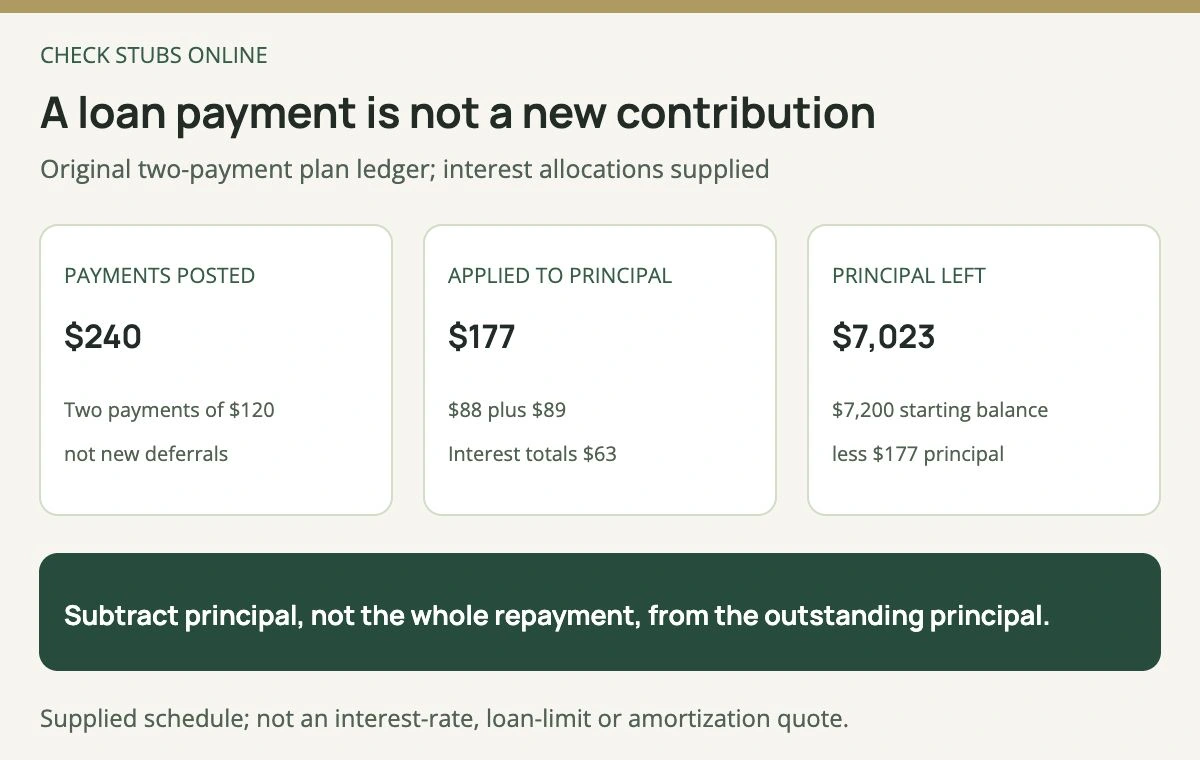
The repayment ledger and contribution ledger answer different questions. This example does not calculate the plan’s interest rate.
The participant’s overall retirement account can also change because of investments, fees, contributions and other transactions. A $177 loan-principal reduction does not promise a $177 change in the portal’s total investment value. Use the loan-specific balance for this test.
## Original example: separate a $150 deferral from a $120 repayment
Now assume a fictional paycheck contains $2,500 gross cash wages, $530 total employee taxes, a valid $150 new retirement contribution and a separate $120 loan repayment. There are no other earnings, deductions or payment destinations. The $530 is supplied for the cash reconciliation; no filing status, tax table or personal withholding result is being derived.
**Fictional cash-pay reconciliation: each reduction appears once**
| Line | Amount | Separate treatment |
| --- | --- | --- |
| Gross cash earnings | $2,500 | Start of the cash ledger |
| Employee taxes | −$530 | Supplied total, not a tax quote |
| New retirement contribution | −$150 | Check its own traditional/Roth election |
| Participant-loan payment | −$120 | Match to the loan ledger |
| Net cash | $1,700 | $2,500 − $530 − $150 − $120 |
Without the $120 repayment and with all other supplied amounts unchanged, this limited ledger would leave $1,820. The repayment’s cash effect here is $120, even though only $88 of the first loan payment reduces principal. Interest is part of the payment leaving payroll too.
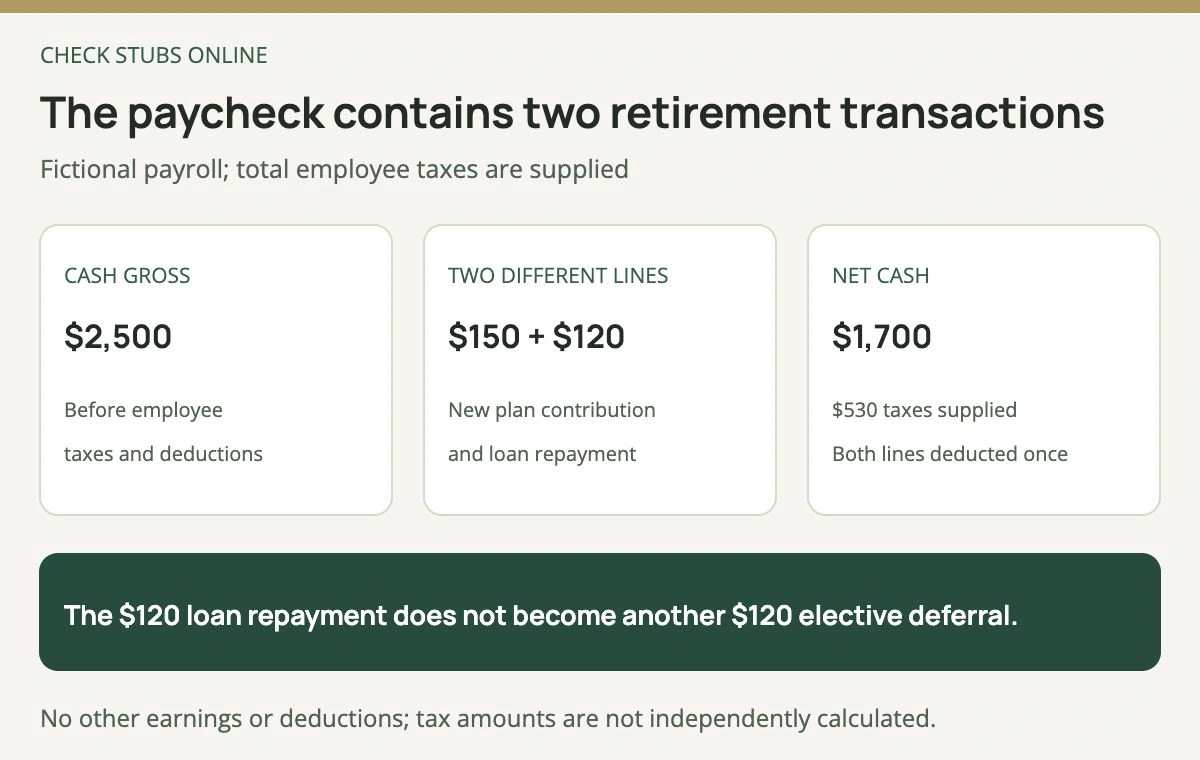
Both the $150 contribution and $120 repayment reduce cash in this example. They remain separate categories in the plan records.
The [pre-tax/post-tax guide](https://blog.checkstubsonline.com/pre-tax-vs-post-tax-deductions) explains why cash deductions and tax bases must be checked separately. A valid contribution’s treatment does not turn loan repayment into another tax-excluded salary deferral. Ask the administrator about any unusual Roth, prior-distribution or correction history before inferring tax basis from the payroll label.
## What if payroll withheld money but the loan record did not update?
Identify the paycheck, deduction amount, loan reference and administrator’s posting date. Compare a payroll cutoff with the plan transaction history, not just a rounded account total. A timing difference needs an explanation; it does not by itself establish that funds were lost or that no payment is due.
1. **Confirm the deduction occurred.** Retain the actual wage statement and check whether the payment was canceled or replaced.
2. **Verify the destination.** Ask whether payroll assigned it to the correct loan and participant account.
3. **Get the transfer reference.** Request the remittance and posting information from the employer and administrator.
4. **Review allocation.** Compare principal, interest, fees and any catch-up entry with the agreement.
5. **Resolve the deadline separately.** Ask what action is required while a trace is pending; do not assume an administrative problem suspends all repayment terms.
A useful message is: “The paycheck dated \[date\] shows $120 for loan \[approved identifier\], but the plan history through \[date\] lacks that payment. Please trace the remittance and confirm the principal/interest allocation and any action needed before the loan deadline.” Use secure channels and omit account passwords or unrelated bank information.
If a deduction is duplicated, keep the correction linked to the original entry. An employer cash refund and a reversal of a posted loan payment are not automatically the same transaction. Request the effect on both payroll and the plan balance before treating the matter as resolved.
## What should you do before leave or a job change?
The IRS’s [participant-loan overview](https://www.irs.gov/retirement-plans/considering-a-loan-from-your-401k-plan) tells borrowers to examine the plan terms and job-change consequences. Obtain written answers before deductions stop: whether repayment can continue directly, how to enroll in that method, the next due date and whether employment separation changes the balance due.
A new employer’s payroll does not automatically take over the old plan’s loan. Keep the old administrator’s instructions and the final employer deduction together. If the final statement includes severance or other amounts, do not assume the employer may take the entire balance from that payment; confirm the applicable agreement and rules.
Leave treatment can have special conditions. Ask for the actual suspension, catch-up or revised schedule rather than stopping payments based on a general online summary. A statement with no wages or deductions is not written approval of a repayment holiday.
## What is the difference between default and a plan loan offset?
The IRS FAQ distinguishes a taxable *deemed distribution* after a loan fails its requirements from a *plan loan offset*, where the plan reduces the account to satisfy the unpaid loan. A deemed distribution is not eligible for rollover; an eligible offset may be. Obtain the actual event, date, balance and notice instead of treating every payroll interruption as an immediate withdrawal.
The currently published [2025 Publication 575](https://www.irs.gov/publications/p575) explains the qualified plan loan offset category and its longer rollover window tied to the return due date, including extensions, for the offset year. Other offsets generally have the ordinary 60-day period. The category has conditions; not every unpaid loan after a job change qualifies. Ask the administrator and an appropriate tax adviser which event occurred and what current-year instructions apply.
**Different loan events require different follow-up**
| Event | What to request | Do not assume |
| --- | --- | --- |
| Payroll collection stops | Written next-payment method and due date | The debt was canceled |
| Deemed distribution | Default details and tax reporting | A rollover will automatically cure it |
| Plan loan offset | Account reduction, eligibility and event date | Every offset has the longer deadline |
| Qualified plan loan offset | Evidence supporting that classification | Employment separation alone settles every condition |
An offset can create tax reporting even without a new cash deposit. Conversely, a normal posted loan repayment does not become a new taxable distribution merely because it appears on a pay stub. This guide does not determine additional tax, exceptions, rollover eligibility or how a prior taxable distribution changes later basis.
## Which records belong in your year-end file?
Keep the agreement, current schedule, employer deduction history, plan posting history, principal/interest allocation and any leave or separation instructions. Save default, offset or distribution notices and any issued Form 1099-R. Use the actual form’s year and explanatory codes with its instructions; a payroll YTD loan total is not a substitute for that tax record.
Track new employee contributions separately from repayments. If a case includes a corrected or taxable distribution, request the administrator’s reporting explanation rather than trying to solve it by renaming a payroll deduction. For the annual statement’s general purpose, see [the 1099-R record guide](https://blog.checkstubsonline.com/1099-r-online-retirement-distribution-guide).
Payroll can explain an employer deduction; the plan administrator explains the loan balance and terms. Our [payroll responsibility guide](https://blog.checkstubsonline.com/who-handles-payroll-in-a-company) helps route the first question. A paycheck document builder cannot change a plan loan, post its payment or resolve its tax status.
## 401(k) loan repayment questions
### Does repayment count as another retirement contribution?
No. The IRS distinguishes loan repayments from contributions. Keep elective deferrals, employer funding and loan payments in separate records.
### Why did principal fall less than the deduction?
Interest or an authorized charge may explain part of a payment. In the original two-payment ledger, $240 paid includes $177 principal and $63 interest. Check your actual allocation.
### Can I stop paying when I leave the employer?
Do not assume so. Request the loan’s next steps, due dates and any direct-payment option before payroll deductions end.
### Does no new cash mean no distribution reporting?
No. A loan offset can reduce the retirement account without paying new cash to the participant. Obtain the notice and reporting details for the actual event.
The Check Stubs Online Editorial Team reviewed the linked IRS primary guidance. The principal, interest and paycheck ledgers are original fictional examples with independently checked arithmetic; they are not personalized borrowing or tax advice.
## Relevant document tool
Check the rules behind the plan’s loan notice
Use the IRS loan FAQ alongside the actual repayment agreement, payment ledger and administrator’s explanation.
[Review IRS plan-loan guidance](https://www.irs.gov/retirement-plans/retirement-plans-faqs-regarding-loans)
This guidance does not quote an available loan, decide a plan’s repayment options or calculate your personal distribution tax.
## Related guides
- [401(k) on a Pay Stub: Deductions, Match and Missing Deposits](https://blog.checkstubsonline.com/401k-on-pay-stub)
- [Pre-Tax vs. Post-Tax Deductions: Read Your Paycheck](https://blog.checkstubsonline.com/pre-tax-vs-post-tax-deductions)
- [Who Handles Payroll in a Company? A Guide to the Right Contact](https://blog.checkstubsonline.com/who-handles-payroll-in-a-company)