---
title: "401(k) on a Pay Stub: Deductions, Match and Missing Deposits"
description: "Reconcile traditional and Roth 401(k) deductions, employer matches and plan deposits. Includes checked examples, 2026 limits and steps for missing contributions."
url: "https://blog.checkstubsonline.com/401k-on-pay-stub"
datePublished: "2026-11-23"
---
# 401(k) on a Pay Stub: Deductions, Match and Missing Deposits
Reconcile traditional and Roth 401(k) deductions, employer matches and plan deposits. Includes checked examples, 2026 limits and steps for missing contributions.
Published: 2026-11-23
By [Check Stubs Online Editorial Team](https://blog.checkstubsonline.com/editorial-policy#editorial-team)
**A 401(k) line on a pay stub usually records money taken from your wages for a workplace retirement plan; a company match is a separate employer contribution.** Identify traditional, designated Roth and any other contribution types, check the plan’s eligible-pay definition and match formula, then compare payroll deductions with the plan’s contribution ledger. A deduction shown on a statement does not by itself confirm that the retirement account received it.
Reviewed November 24, 2026 · Ordinary U.S. employee 401(k) contribution records and 2026 federal limits. Examples are fictional and use expressly supplied plan terms. This guide does not choose investments, recommend a contribution election or determine an individual’s complete tax result.
Your pay statement and retirement portal answer different questions. Payroll explains the reduction in cash wages and any company contribution information. The plan ledger identifies credited contributions, their sources and posting dates. Reviewing both can resolve an apparent missing match or a contribution total that looks too large.
For a general explanation of wage bases, read [pre-tax versus post-tax paycheck deductions](https://blog.checkstubsonline.com/pre-tax-vs-post-tax-deductions). This guide concentrates on tracing the retirement money, checking the actual match and keeping annual employee limits separate from employer funding.
## In this guide
1. [Identify the contribution type](#retirement-labels)
2. [Calculate an employee contribution and match](#retirement-example)
3. [Explain the taxable-wage difference](#retirement-tax)
4. [Check match timing, eligible pay and vesting](#retirement-match)
5. [Track 2026 employee limits across jobs](#retirement-limit)
6. [Trace a deduction missing from the plan](#retirement-missing)
7. [Reconcile year-end records](#retirement-yearend)
8. [Keep an accurate supporting statement](#retirement-records)
9. [401(k) paycheck questions](#retirement-faq)
## Identify which 401(k) contribution the line describes
Payroll labels vary. “401K,” “ROTH,” “RET” or “ER MATCH” needs a definition from the employer or plan administrator. The [IRS contribution overview](https://www.irs.gov/retirement-plans/plan-participant-employee/retirement-topics-contributions) distinguishes employee salary deferrals, designated Roth deferrals, other after-tax contributions and employer funding. Those categories should remain distinct in your worksheet.
**Four contribution categories to keep separate**
| Entry | Who supplies the money? | What to check |
| --- | --- | --- |
| Traditional employee deferral | Employee wages directed to the plan | The election, eligible-pay base and pre-tax payroll treatment |
| Designated Roth employee deferral | Employee wages directed to the plan | The Roth election and current taxable-wage treatment |
| Employer match or nonelective contribution | Employer funding under the plan | The formula, contribution period, source account and vesting |
| Other employee after-tax contribution | Employee wages, if the plan permits this category | The administrator’s classification; after-tax does not automatically mean Roth |
A retirement-plan loan repayment is another distinct entry: do not automatically add it to employee elective deferrals. Likewise, an employer match shown as a memo should not be subtracted from your cash a second time. Our [employer-paid benefit explanation](https://blog.checkstubsonline.com/employer-paid-benefits-pay-stub) shows how informational company amounts differ from employee charges.
## Original example: $224 from the employee and a $96 match
Assume a fictional plan defines the full $3,200 of this paycheck as eligible compensation. An employee elects 5% traditional and 2% designated Roth deferrals. The plan permits both and matches 50% of combined employee deferrals on the first 6% of eligible pay, calculated each paycheck. Assume no contribution limits, exclusions or corrections reduce these amounts.
**Fictional paycheck: employee deferrals and employer match**
| Component | Calculation | Amount |
| --- | --- | --- |
| Traditional employee contribution | $3,200 × 5% | $160.00 |
| Designated Roth employee contribution | $3,200 × 2% | $64.00 |
| Total employee retirement deduction | $160 + $64 | $224.00 |
| Deferrals eligible for this match | $3,200 × min(7%, 6%) | $192.00 |
| Employer match | $192 × 50% | $96.00 |
| Combined contribution funding | $224 + $96 | $320.00 |
The employee’s retirement-related cash reduction is $224. The $96 company match adds retirement funding; it does not make the employee deduction $320. This illustration calculates contributions only. Taxes, other benefits and the rest of the paycheck must still be reconciled before determining the bank deposit.
For 26 identical eligible paychecks, the employee contributions would total $5,824 and the company match $2,496, producing $8,320 of contribution funding. That is a projection under unchanged fictional terms, not an account-value forecast. Investment returns, fees, distributions, eligibility changes and the plan’s actual posting practices can change the account statement.
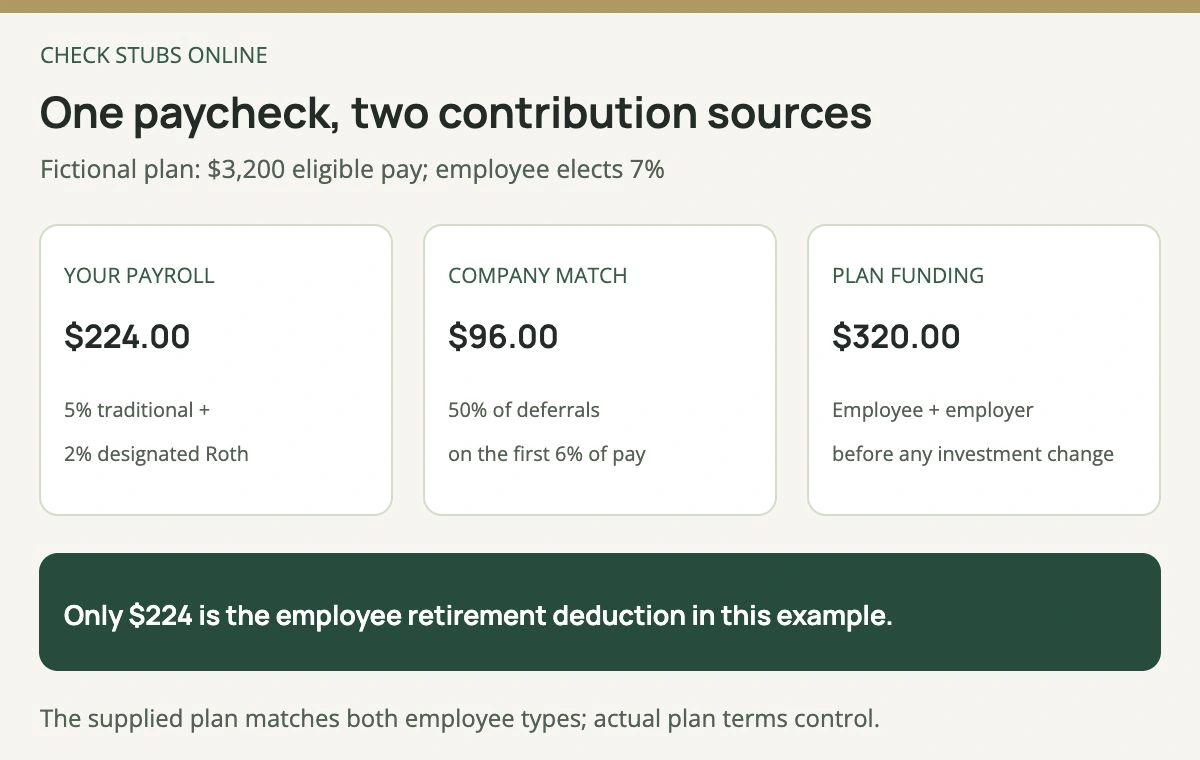
Follow the source of each dollar. The company’s match is additional plan funding under the assumed formula, not another employee deduction.
## Why can traditional and Roth deductions affect taxable wages differently?
[IRS Topic 424](https://www.irs.gov/taxtopics/tc424) explains that ordinary traditional 401(k) deferrals generally are excluded from current federal income-tax wages but remain in Social Security and Medicare wages. Designated Roth employee deferrals remain in current federal taxable income. State treatment and other payroll items need their own review.
In the supplied $3,200 example, with no other wage adjustments, the $160 traditional deferral leaves $3,040 of federal income-tax wages. The $64 Roth deferral does not reduce that amount further. Social Security and Medicare wages remain $3,200 under the ordinary coverage assumptions. This does not mean $3,040 is net pay or that $160 is the tax saved.
The actual federal withholding depends on the applicable payroll calculation and W-4, among other inputs. Changing the same dollar election from traditional to Roth can alter taxable wages without changing how much you contribute. For annual reporting, compare [W-2 Boxes 1, 3 and 5](https://blog.checkstubsonline.com/w2-boxes-1-3-5-different) rather than expecting all wage totals to match.
## Check eligible pay, match timing and vesting before calling the match wrong
Read the Summary Plan Description and current match terms. Ask which compensation counts: the rule may treat bonuses, overtime or other earnings differently. Then identify whether the match is calculated each payroll or over a longer period, and whether a year-end true-up applies. A true-up is a plan-specific adjustment; it is not something every employer promises.
In the fictional formula, 50% of deferrals on the first 6% of pay caps the match at 3% of eligible compensation. Contributing 7% does not produce a 3.5% match because the assumed match stops at the 6% deferral band. Do not reuse that result for a dollar-for-dollar formula or for pay excluded by another plan.
Funding and ownership are also separate checks. The [IRS vesting explanation](https://www.irs.gov/retirement-plans/plan-participant-employee/retirement-topics-vesting) says employee contributions are fully vested, while employer amounts can follow the applicable plan’s vesting rules. A displayed employer contribution is not necessarily the same as its vested portion. Ask for the service calculation and contribution category instead of estimating ownership from the pay-stub memo.
Nor must every match always be pre-tax. Some plans allow designated Roth employer matching or nonelective contributions under SECURE 2.0. The [IRS guidance in Notice 2024-2, section L](https://www.irs.gov/irb/2024-02_IRB#NOT-2024-2) addresses conditions, including full vesting for the designation. The [2026 Form 1099-R instructions](https://www.irs.gov/instructions/i1099r) explain the separate reporting. Ask whether your plan offers that feature; an employee Roth election alone does not establish that the employer match is Roth.
## Track the 2026 employee limit across traditional and Roth contributions
For an ordinary 401(k), the 2026 basic employee elective-deferral limit is $24,500, subject to compensation and applicable plan restrictions. Traditional and designated Roth employee deferrals share that limit. Employer matching contributions do not use the employee’s basic deferral allowance, but separate overall contribution limits still apply. These are 2026 figures, not the limits for every contribution year.
[Notice 2025-67 in the IRS’s 2025-49 bulletin](https://www.irs.gov/irb/2025-49_IRB) sets the 2026 amounts. If permitted and applicable, the ordinary age-50 catch-up is $8,000; an eligible person attaining age 60, 61, 62 or 63 in 2026 has the higher $11,250 catch-up instead. Do not add both catch-up amounts. Plan, compensation and testing restrictions can require a more specific calculation.
The [current IRS catch-up guidance](https://www.irs.gov/retirement-plans/plan-participant-employee/retirement-topics-catch-up-contributions) also addresses Roth treatment beginning in 2026 when relevant prior-year wages from the plan sponsor exceed $150,000. Ask the administrator how that rule applies to your situation. It concerns catch-up classification, not an automatic conversion of every regular contribution to Roth.
A second employer does not normally supply a second independent basic 401(k) employee allowance. The [IRS multiple-plan explanation](https://www.irs.gov/retirement-plans/how-much-salary-can-you-defer-if-youre-eligible-for-more-than-one-retirement-plan) covers aggregation and distinct plan types; use its framework with the current year’s limits rather than copying an older numerical example.
For a fictional worker under 50 with sufficient compensation, assume $11,700 of 2026 employee deferrals at a first job and $10,900 at a second. The combined $22,600 leaves $1,900 below the $24,500 basic federal ceiling, before any other covered deferrals or tighter applicable restriction. An employer match is not added to that $22,600 employee total. Share the earlier employee totals with the new administrator and ask how to prevent an excess.
## What if payroll deducted the money but the plan has not credited it?
Start with transactions for the same pay dates, not the retirement account’s changing market value. Save each affected pay statement, the contribution election and a plan transaction export showing source type, contribution amount and credited date. Confirm that you are viewing the current plan and the full date range rather than an older employer account.
1. **List the payroll deductions.** Keep traditional and Roth amounts separate for each payday.
2. **Request remittance details.** Ask payroll when each employee amount was forwarded, which payroll batch it belonged to and whether a rejection or correction occurred.
3. **Ask the recordkeeper to trace the credits.** Supply the pay dates, contribution amounts and employer-provided transfer reference through its secure channel.
4. **Review the employer match independently.** Obtain its calculation and required funding schedule instead of applying employee-remittance timing automatically.
5. **Retain a written resolution.** Record the eventual credit, any correction and the explanation for the difference.
For two paychecks with the example’s unchanged elections, the employee deductions being traced total $448. The separately expected match under the supplied per-paycheck formula totals $192. A $640 difference in total funding should therefore be split into two source questions, not reported as $640 taken from the employee’s pay.
For covered private-sector plans, [Department of Labor guidance on employer responsibilities](https://www.dol.gov/agencies/ebsa/employers-and-advisers/small-business-owners/understanding-your-responsibilities) requires forwarding employee payroll contributions as soon as possible and describes the seven-business-day provision for plans with fewer than 100 participants. Its guidance separately refers employer matching/discretionary funding to plan terms. Do not assume an employee deduction can sit unremitted simply because the next statement has not arrived.
If repeated requests do not resolve an unexplained missing contribution, contact an [EBSA benefits adviser](https://www.dol.gov/agencies/ebsa/about-ebsa/ask-a-question/ask-ebsa) for help with a covered plan. A temporary posting difference is not by itself a finding of misuse; preserve evidence and seek an explanation. A payroll statement correction and a missing plan deposit can require different remedies.
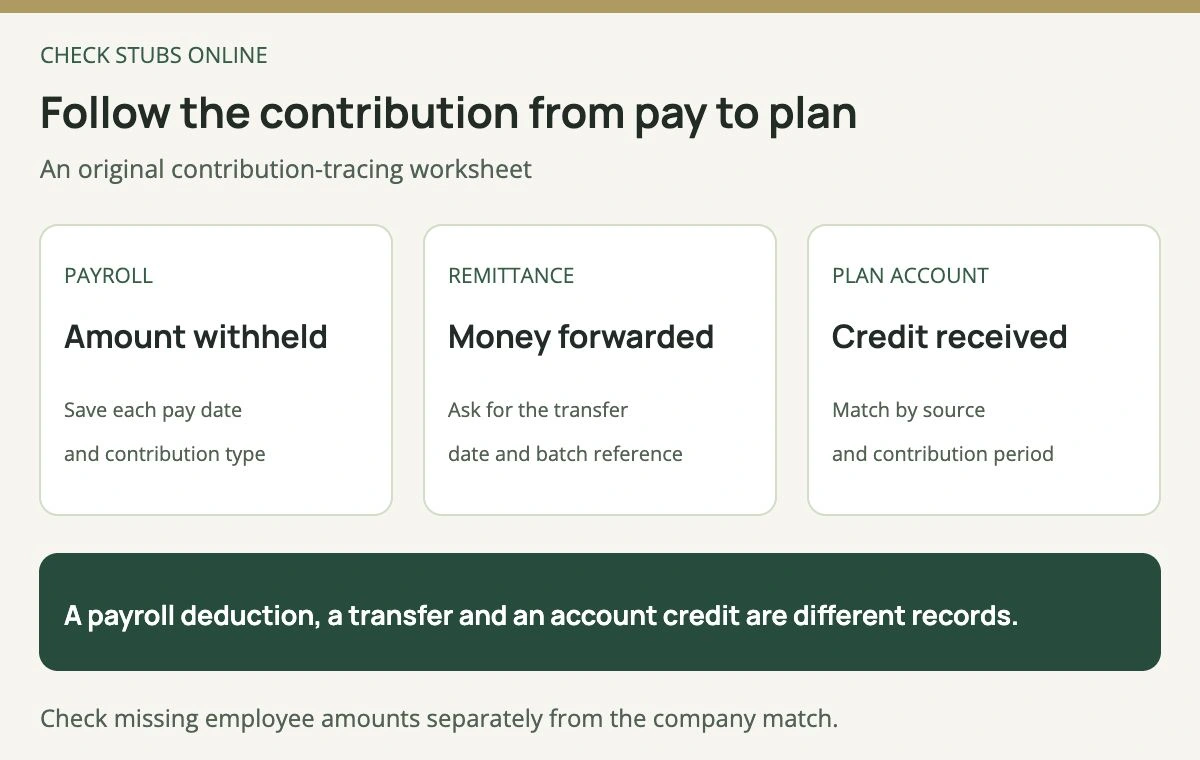
Trace dates and source categories through payroll, remittance information and the plan ledger. An account balance alone cannot perform this check.
## Reconcile the contribution year, W-2 and plan records
Use the [W-2 instructions for 2026](https://www.irs.gov/instructions/iw2w3) to map traditional employee 401(k) deferrals to code D and designated Roth employee deferrals to code AA. Our [Box 12 code guide](https://blog.checkstubsonline.com/w2-box-12-codes-d-aa-dd-w) explains why these informational entries are not extra wages to add blindly.
Maintain columns for payday, payroll contribution type, contribution year, amount withheld, amount credited and any correction. A plan posting early in January can need a different explanation from a January wage deferral; ask which payroll and contribution period the credit represents. Do not move the year yourself to make two screens match.
After changing jobs or payroll providers, keep the prior employer totals and the new system’s opening balances. The [payroll-system change checklist](https://blog.checkstubsonline.com/payroll-provider-change-ytd-checklist) helps distinguish a display reset from missing annual history. Do not add successive cumulative YTD figures together.
## Keep the supporting paycheck record accurate
If an employer or authorized preparer uses a [pay stub maker](https://www.checkstubsonline.com/pay-stub-maker) to document actual pay, enter reconciled earnings and employee deductions. Keep employer contributions clearly identified as employer funding. Review the preview against the underlying payroll and benefit records before sharing it.
A prepared statement does not send money to a retirement plan, establish vesting, choose the plan’s tax treatment or independently verify employment. An employee seeking an official employer statement should request it from payroll. For a wrong payroll entry, use the [issuer correction process](https://blog.checkstubsonline.com/pay-stub-errors-correction) and retain the plan’s separate response if the account credit is also affected.
## 401(k) paycheck questions
### Does the company match come out of my paycheck?
An employer match is employer funding. In this guide’s supplied example, $224 is deducted from employee wages and the company separately contributes $96. Check the actual section labels and plan formula.
### Does a traditional 401(k) deduction reduce Social Security tax?
Ordinary employee traditional deferrals remain in Social Security and Medicare wages. They generally reduce current federal income-tax wages, which is a different base.
### Do traditional and Roth 401(k) elections have separate employee limits?
No. They share the applicable employee elective-deferral limit. Track both categories and covered deferrals at other jobs; any employer contribution and catch-up treatment need separate checks.
### Why is my plan balance different from YTD contributions?
A balance can include earlier savings, gains or losses, fees, distributions and transfers. Compare the plan’s contribution transactions with payroll for the same periods instead.
### Is a missing match always an error?
No. Eligibility, excluded compensation, funding timing, a true-up provision or the match formula may explain it. Ask the administrator to apply the actual written terms to the affected pay periods.
The Check Stubs Online Editorial Team reviewed the linked IRS and Department of Labor guidance. The supplied match plan, contribution examples and tracing worksheet are original educational illustrations; their arithmetic was independently checked.
## Relevant document tool
Understand what your 401(k) payroll entry represents
Compare the IRS explanation with your election, the written plan terms and the administrator’s contribution ledger.
[Read the IRS 401(k) guidance](https://www.irs.gov/taxtopics/tc424)
Plan-specific questions belong with the administrator. A paycheck document does not confirm that plan funding was received.
## Related guides
- [Pre-Tax vs. Post-Tax Deductions: Read Your Paycheck](https://blog.checkstubsonline.com/pre-tax-vs-post-tax-deductions)
- [New Payroll System? Check Your First Pay Stub and YTD Totals](https://blog.checkstubsonline.com/payroll-provider-change-ytd-checklist)
- [Pay Stub Errors: How to Request and Track a Correction](https://blog.checkstubsonline.com/pay-stub-errors-correction)