---
title: "ADP Pay Stubs: Official Access, Downloads and Employer Help"
description: "Find official ADP pay-statement access, resolve employer account problems, request older copies and check downloaded PDFs for missing periods or duplicates."
url: "https://blog.checkstubsonline.com/adp-pay-stubs-official-access"
datePublished: "2026-11-17"
---
# ADP Pay Stubs: Official Access, Downloads and Employer Help
Find official ADP pay-statement access, resolve employer account problems, request older copies and check downloaded PDFs for missing periods or duplicates.
Published: 2026-11-17
By [Check Stubs Online Editorial Team](https://blog.checkstubsonline.com/editorial-policy#editorial-team)
**To retrieve an official ADP pay statement, use the access your employer provides and start with ADP’s official sign-in or support pages.** If you cannot register, see the right employer or recover access, contact the relevant payroll or HR team. An unrelated pay-stub generator cannot open your ADP account, recover its history or turn a newly prepared document into an ADP-issued statement.
Reviewed November 17, 2026 · U.S. employee access and record organization. This independent Check Stubs Online guide is not affiliated with ADP. Employer arrangements and product screens vary. The original worksheet below is fictional and does not reproduce an ADP pay statement or login screen.
Start at [ADP’s official MyADP access guide](https://www.adp.com/logins/my-adp), which links to its sign-in service. Use the product your employer actually supports. If the request is for an employer-issued statement, preserve that original record rather than trying to recreate its appearance.
## In this guide
1. [Start with the correct employer and official access](#adp-start)
2. [Resolve registration and login problems](#adp-problems)
3. [Collect and check the actual statement files](#adp-files)
4. [Review a six-week retrieval example](#adp-example)
5. [Request records from a former employer](#adp-former)
6. [Handle missing or incorrect information](#adp-corrections)
7. [Understand the limits of a separate maker](#adp-maker)
8. [Official ADP pay-statement questions](#adp-faq)
## Confirm the employer and product before signing in
Ask payroll which employee service contains your statements and whether online access has been enabled for you. A company using ADP for a service does not, by itself, tell you that every employee has the same portal, registration route or document history.
The [official MyADP guide](https://www.adp.com/logins/my-adp) directs employees with employer-provided access to [signin.adp.com](https://signin.adp.com/). It says first-time users need a registration code supplied by their employer. Obtain that information from your own payroll or HR contact rather than a public code posted for a different company.
Use the official route and the account associated with the relevant employment. Do not assume an old login belongs to a new job merely because both employers use ADP. The company name and statement dates inside the account should match the records you need.
## Choose the help route that matches the access problem
The [ADP login-help page](https://www.adp.com/contact-us/support-for-employees/adp-login-help) describes official recovery options and directs unresolved access problems to the current or former employer. Follow the recovery prompts on the legitimate service. Exact labels and identity checks may differ by product, so a generic sequence of screenshots is not reliable for every employee.
**Identify the access issue before requesting help**
| What you see | Useful next step | Information to identify for payroll |
| --- | --- | --- |
| You have never registered | Confirm that online employee access is offered and request the employer’s registration instructions | Employer and employment start period |
| You cannot remember the login | Use the official service’s ID or password recovery options | Which employer account you are trying to access |
| You cannot complete account recovery | Ask the employer’s payroll or HR team for the appropriate access help | The error message and whether contact details changed |
| The account shows a previous employer | Ask the new employer to confirm the correct current access setup | Old versus current employer shown |
| You can sign in but cannot find a statement | Ask whether that pay period is available in that service | Requested period, pay date and missing document |
The [official employee-support page](https://www.adp.com/contact-us/support-for-employees) specifically addresses changed authentication phone numbers and seeing a former employer after starting a new job. It points those issues to the relevant employer’s HR or payroll team. Do not assume all employer histories automatically merge into one visible account.
ADP’s login-help guidance explains that it cannot provide employee login assistance directly and that employers can contact their ADP client service team when they need help. Keep credentials and verification codes out of an ordinary help request. Describe the issue through the employer’s established process instead.
## Check the statement before saving or sharing it
Once you reach the employer’s pay information, locate the statement for the needed pay date or covered period. Use the service’s available download or print option. The location of these controls depends on the product; if the expected option is absent, ask payroll how that employer distributes copies.
Open each saved file and check that it contains the full statement rather than a login page, blank page or cropped browser view. Review the employer, your identifying details, period dates, pay date and earnings. Keep a complete original copy in a private folder, with a filename that distinguishes the employer and pay date.
For a document request, clarify whether the reviewer wants recent pay dates, a defined period of earnings or another time window. A pay date can follow the period it covers. Our [pay period versus pay date guide](https://blog.checkstubsonline.com/pay-period-vs-pay-date) explains that distinction; neither a filename nor a download date establishes the earnings period.
Ask the recipient which secure delivery method to use and whether specific personal details may be redacted. Keep the unaltered source version privately. Do not remove an identifier or field the reviewer needs without first clarifying the requirement.
## Original example: three statements cover six weeks
Suppose a fictional employee is organizing statements for six consecutive weeks from July 27 through September 6, 2026. Assume the actual payroll periods are biweekly and match the three periods below. This is an organizational example, not a landlord’s or lender’s universal document rule.
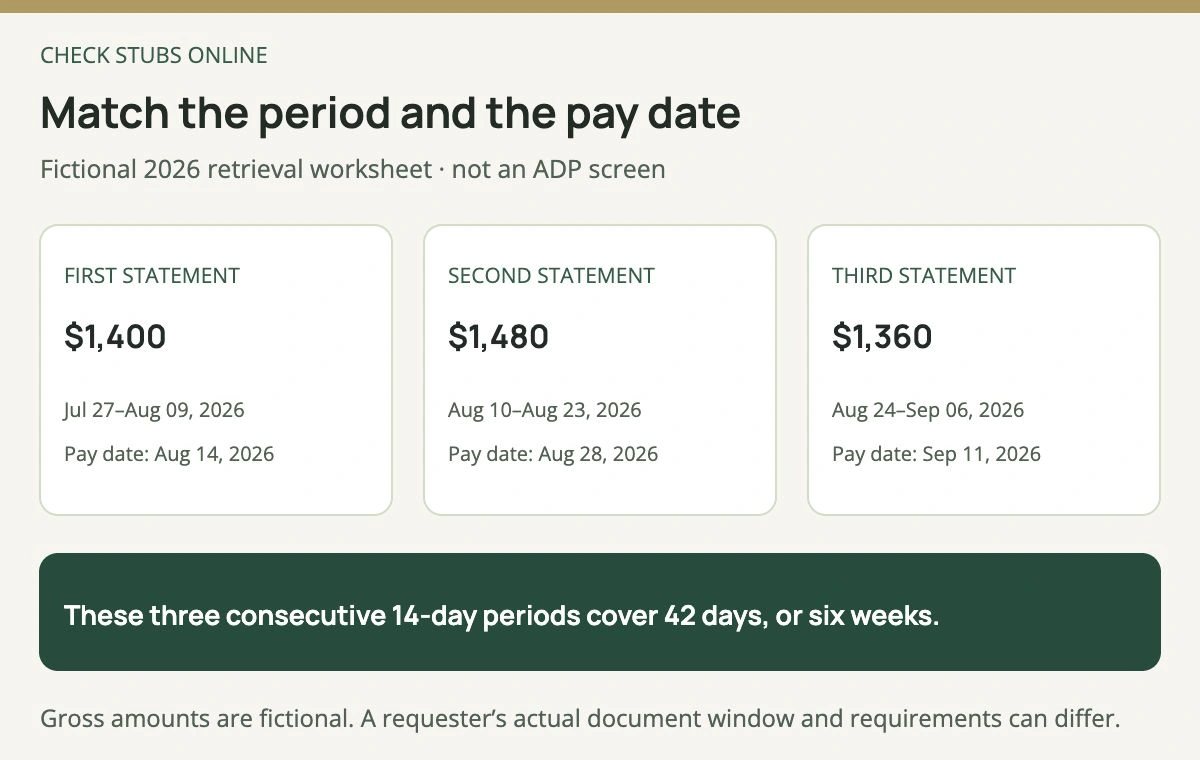
Each period contains 14 calendar days. The later pay dates identify the payments; they do not move the covered work into a different period.
Three periods × 14 days = 42 days, and six weeks × seven days also equals 42. The worksheet has no gap between August 9 and August 10 or between August 23 and August 24. If one statement were missing, downloading another copy of an adjacent period would not fill that gap.
The fictional gross amounts are $1,400, $1,480 and $1,360, totaling $4,240. Now assume the second statement was accidentally downloaded twice with different filenames. Four PDF files would still represent three statements, not four pay periods.
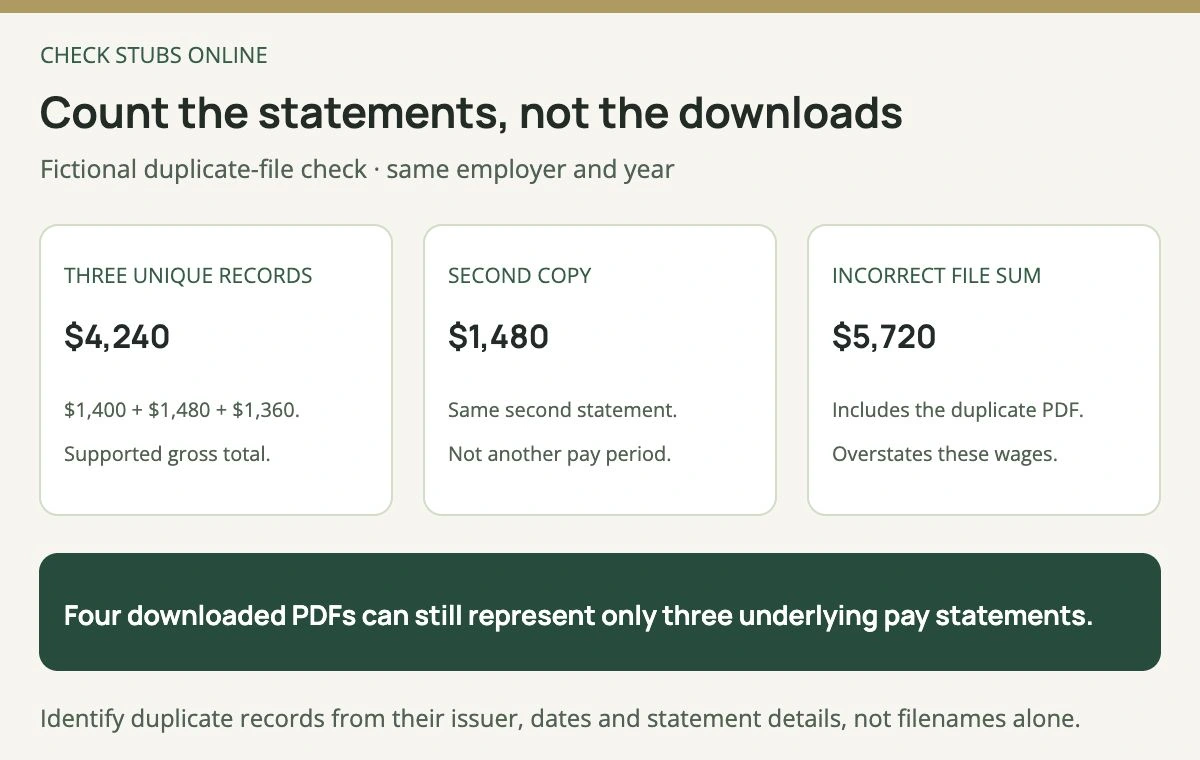
The incorrect $5,720 sum includes the same $1,480 statement twice. Downloading a file does not create another wage payment.
For a duplicate check, compare the issuer, period, pay date and statement details. Equal amounts alone do not prove duplication: two genuinely different pay periods can have the same gross or net pay. Likewise, different filenames do not prove that the documents are distinct.
If the real request is for the latest three pay dates, follow that requirement instead of imposing this six-week window. When the employee has irregular pay, off-cycle payments or a payroll-provider change, a simple three-file count can be especially misleading.
## Former employees should request the specific missing records
ADP’s [employee tax-document guide](https://www.adp.com/contact-us/support-for-employees/form-w2-and-form-1099-for-employees) says a former employee who previously used the portal can try existing access. It also explains that a former employer may have removed that account and directs W-2 copy requests to the employer. It does not promise that every former employee retains the same online history indefinitely.
For periodic pay statements, name the records you actually need: employer, employment dates, pay dates or covered periods, and the requested format. Ask former payroll or HR whether copies can be supplied securely if portal access is unavailable. Keep a dated record of the request and any reply.
If the business has closed, our [closed-employer payroll-record guide](https://blog.checkstubsonline.com/pay-stubs-employer-closed) covers additional record-finding steps. An IRS annual information record is not a replacement for every individual pay statement. The [IRS wage transcript versus W-2 guide](https://blog.checkstubsonline.com/irs-wage-income-transcript-vs-w2) explains the scope of that different evidence.
## Missing access and incorrect pay require different requests
Successfully downloading a PDF does not establish that its amounts are right. Compare hours, rate, earnings and deductions with the underlying records. Our [field-by-field pay-stub guide](https://blog.checkstubsonline.com/how-to-read-pay-stub) can help identify which section is in question.
ADP’s employee-support guidance directs paycheck errors to the employer’s payroll team. Report the specific period and disputed field, with supporting information, through that process. Do not edit an issued PDF yourself and present it as the corrected employer record.
A payroll conversion can also affect where older statements appear. If the employer has changed providers, ask which system holds the earlier periods and how to request them. Our [payroll-system change checklist](https://blog.checkstubsonline.com/payroll-provider-change-ytd-checklist) explains why opening year-to-date amounts need their own reconciliation.
Keep the missing-copy request separate from any pay correction request so each has a clear outcome. Our [pay-stub correction guide](https://blog.checkstubsonline.com/pay-stub-errors-correction) provides a more detailed record trail for disputed amounts. State access and delivery requirements are a separate topic covered in the [electronic pay-statement guide](https://blog.checkstubsonline.com/electronic-pay-stubs-access).
## What a separate pay-stub maker can and cannot do
The [Check Stubs Online pay-stub maker](https://www.checkstubsonline.com/pay-stub-maker) is a separate document-preparation tool for accurate, authorized payroll records. It does not connect to ADP, retrieve an employer’s historical statements or issue an ADP-authenticated document. A familiar-looking layout would not establish who issued a record.
If the request specifically requires an ADP-issued or employer-provided statement, use the official access or employer-copy route. Do not create a substitute and label it as a recovered original. When no pay statement exists for your type of income, ask what genuine alternative evidence is acceptable; our [proof-of-income alternatives guide](https://blog.checkstubsonline.com/proof-of-income-without-pay-stubs) explains the different records.
## Official ADP pay-statement questions
### Can ADP give me my employer’s registration code?
The reviewed official access guidance says the employer supplies that code. Ask your own payroll or HR team for the appropriate instructions.
### Why does my login show my old employer?
Confirm current access with the new employer. Do not assume that an earlier account automatically contains the new job’s records.
### Can a pay-stub generator recover my ADP password or PDFs?
No. Use official account recovery and employer support for access to those records.
### Are four downloaded files always four pay periods?
No. Check the document details for duplicate copies, off-cycle payments and missing periods.
The Check Stubs Online Editorial Team reviewed official ADP employee-access documentation and independently checked the fictional calendar coverage and duplicate-file arithmetic.
## Relevant document tool
Prepare accurate records for your own payroll
Use Check Stubs Online only for supported, authorized payroll information. Retrieve ADP-issued originals through the employer’s official service.
[Separate tool: pay-stub maker](https://www.checkstubsonline.com/pay-stub-maker)
Check Stubs Online is not affiliated with ADP. This maker cannot access ADP, recover its statements or provide an ADP-issued replacement. Document acceptance depends on the recipient’s actual requirements.
## Related guides
- [Electronic Pay Stubs: Access, Printing and State Rule Checks](https://blog.checkstubsonline.com/electronic-pay-stubs-access)
- [How to Get Pay Stubs When Your Former Employer Has Closed](https://blog.checkstubsonline.com/pay-stubs-employer-closed)
- [How to Read a Pay Stub: Dates, Earnings, Deductions and YTD](https://blog.checkstubsonline.com/how-to-read-pay-stub)