---
title: "Pay Stub Errors: How to Request and Track a Correction"
description: "Found missing hours or a pay-stub discrepancy? Preserve the original, check an hours-and-net-pay example, request a specific correction and reconcile the payment."
url: "https://blog.checkstubsonline.com/pay-stub-errors-correction"
datePublished: "2026-11-11"
---
# Pay Stub Errors: How to Request and Track a Correction
Found missing hours or a pay-stub discrepancy? Preserve the original, check an hours-and-net-pay example, request a specific correction and reconcile the payment.
Published: 2026-11-11
By [Check Stubs Online Editorial Team](https://blog.checkstubsonline.com/editorial-policy#editorial-team)
**When a pay stub looks wrong, preserve it, identify the specific period and disputed field, and send payroll a documented correction request.** Compare hours, rate, earnings, deductions and actual payment separately. Ask for the employer’s explanation and any corrected statement or adjustment record; changing a copy yourself does not correct the employer’s payroll or prove that money was paid.
Reviewed November 11, 2026 · U.S. employee payroll-record review. Original examples use fictional straight-time hours and supplied deduction amounts. They do not calculate withholding, determine legal coverage, set a correction deadline or resolve a wage claim. State and local requirements can differ.
A small bank deposit is a reason to investigate, but it does not identify the cause. A statement could omit hours, apply a different rate, include a deduction you do not recognize, or describe a payment that has not reached the expected account. A useful request isolates the issue so the responsible person can trace it.
## In this guide
1. [Identify the type of discrepancy](#error-triage)
2. [Preserve records and period details](#error-evidence)
3. [Check an original hours example](#error-hours)
4. [Send a precise payroll request](#error-request)
5. [Review the corrected payment trail](#error-adjustment)
6. [Choose the appropriate escalation route](#error-escalate)
7. [Pay-stub correction questions](#error-faq)
## Start with the field, not the appearance
Read the employer name, pay date and covered period before comparing numbers. Our [pay-period and pay-date guide](https://blog.checkstubsonline.com/pay-period-vs-pay-date) explains why the day cash arrives can differ from the days being paid. Work after the stated cutoff might belong to a later run, while an actual omitted hour within the cutoff deserves a different question.
A change in net pay can also occur with unchanged gross pay. Compare current deductions with the prior statement and the underlying benefit election or withholding instruction. Employer-paid benefit information may be informational rather than a deduction from your check; see [the employer-paid benefits guide](https://blog.checkstubsonline.com/employer-paid-benefits-pay-stub).
Formatting is not a reliable verdict about authenticity. Different payroll systems use different labels and layouts. A typo, unfamiliar abbreviation or arithmetic mismatch calls for explanation and source checking; it does not, alone, establish who created a document or whether a wage violation occurred.
**Match the discrepancy to the evidence needed**
| Question | Compare | Ask payroll to explain |
| --- | --- | --- |
| Are hours missing? | Daily time records, workweek and period cutoff | Which hours entered this run and which remain unpaid |
| Is the pay rate different? | Effective rate notice and earning-code details | Effective date, rate and applicable earnings category |
| Did deductions change? | Election or authorization, tax instruction and statement | What the line represents and why its amount changed |
| Does cash differ from net? | Payment record, bank credits and any split-deposit instruction | Whether payment was split, delayed, returned or replaced |
| Does year-to-date look wrong? | Prior cumulative amount and actual current adjustments | Which amounts were added, reversed or replaced |
## Preserve a small, complete evidence file
Save the original statement before a portal replaces its download. Keep the time entry, schedule, rate notice and relevant payroll message together. Label the documents by issuer and period, keeping your notes in a separate worksheet rather than writing new figures into the issuer’s PDF.
The [Department of Labor’s recordkeeping fact sheet](https://www.dol.gov/agencies/whd/fact-sheets/21-flsa-recordkeeping) describes accurate hours and wage records for covered nonexempt employees, including workweek hours, rates, additions, deductions, amounts paid and payment periods. The form of the record is less important than accurate information.
Separately, the [federal pay-stub advisory](https://webapps.dol.gov/elaws/faq/esa/flsa/018.htm) states that the FLSA does not itself require providing pay stubs. Employer recordkeeping and employee statement delivery are different questions. Check the applicable jurisdiction for statement access, correction timing and other requirements instead of assuming one national deadline.
Record what you actually know. “My time log shows an additional two hours” is a supported statement if the log exists. “Payroll intentionally withheld my wages” asserts a motive your evidence may not establish. Keep the request factual while preserving your ability to raise a genuine wage concern.
## Original example: two omitted straight-time hours
Assume a fictional employee’s agreed rate is $31.25 per hour. A statement covers one workweek and shows 38 straight-time hours, producing $1,187.50 gross. Assume the verified time records instead show 40 hours within that same workweek and cutoff, with no overtime, additional earnings or other pay adjustments.
The supported straight-time result is $1,250.00. The difference is two hours and $62.50 gross. This is a narrow arithmetic check, not a full legal pay determination. Additional rates, premiums, bonuses, covered overtime or local rules would require their own review.
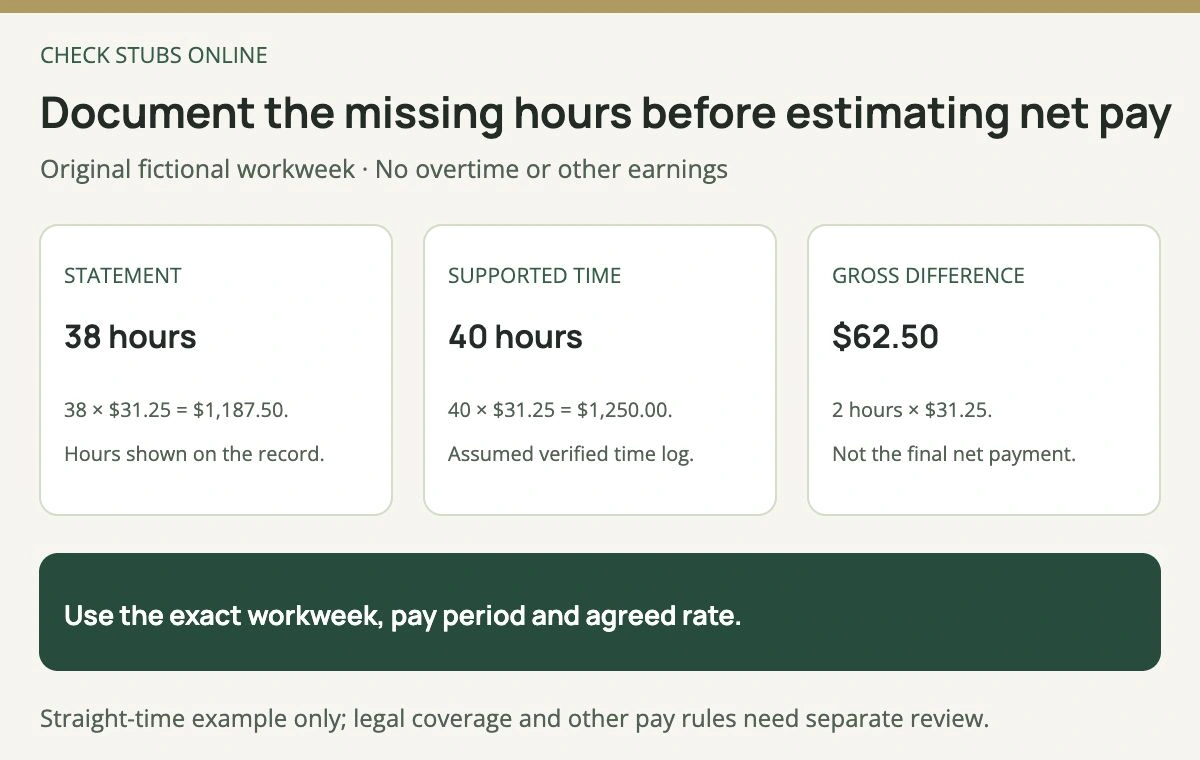
The example first reconciles hours and gross wages. It does not promise a $62.50 increase in the bank deposit.
If the employer says those hours were paid on another run, ask for the period, earning entry and payment record that demonstrate it. If the time log is disputed, retain both versions and ask which change was made and why. A revised schedule alone does not establish that the actual worked hours changed.
For a pay period spanning several workweeks, keep the weekly totals available rather than assuming every hour can be evaluated against one pay-period total. The [semimonthly hours guide](https://blog.checkstubsonline.com/semimonthly-paycheck-hours) demonstrates how payroll cutoffs and workweeks can cross.
## Send one precise request through the approved channel
Identify the statement and the disputed entry, state the supported comparison and attach only the relevant records through the employer’s accepted secure process. Ask what will be corrected, whether payment is outstanding and when you should expect a response under the applicable process.
**Original fictional payroll request**
Please review the statement for the workweek and pay period identified in the attached record. It lists 38 hours at $31.25, while my attached daily time log totals 40 hours within that same period.
Under the stated straight-time assumptions, the gross difference is $62.50. Please confirm which hours were included, explain any adjustment and provide the corresponding corrected statement and payment details if a correction is needed.
Please also clarify whether the original statement will be replaced or whether a separate adjustment statement will be issued. I have kept the original download for reconciliation.
This example is a drafting pattern, not a claim that any actual employer owes these amounts. Replace its facts with your own records. Do not send a full Social Security number, unrelated bank history or another worker’s payroll in a routine message.
Keep the sent request, response and case reference. If payroll needs approval from a manager or a timekeeping team, record that dependency so an unresolved request does not appear completed merely because it was forwarded.
## Review the statement and the money independently
Continue the fictional example with $216.40 total deductions on the original statement and $228.15 on the corrected statement. These are supplied assumptions, not calculated taxes or a recommended deduction treatment. Original net is $971.10, corrected net is $1,021.85, and the net difference is $50.75.
The extra deductions are $11.75, so $62.50 additional gross less $11.75 additional deductions explains the $50.75 net change. Payroll must establish the actual deductions, correction method and amounts for a real case.
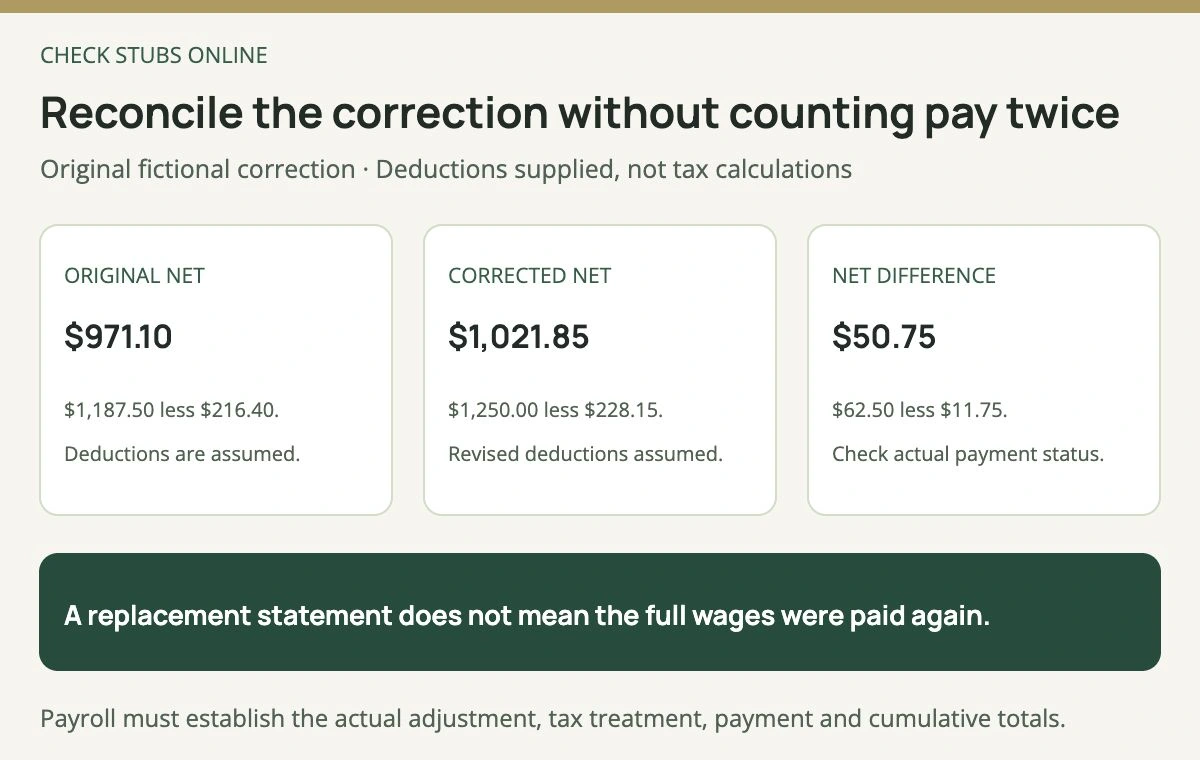
The original and corrected statement describe two versions of the same pay, unless the actual payment records establish an additional transaction.
Suppose the original year-to-date gross was $28,750 and already included the original $1,187.50. If everything else is unchanged and only this omission is corrected, revised year-to-date gross would be $28,812.50: add the $62.50 difference, not another $1,250 full wage amount.
For an adjustment payment, ask how its statement connects to the original run. For a void and reissue, establish whether the original funds were actually reversed. Keep an unresolved returned or pending payment visible instead of marking it received based solely on a new document.
The [Check Stubs Online pay-stub maker](https://www.checkstubsonline.com/pay-stub-maker) includes current-period and prior-year-to-date inputs for authorized preparation from accurate records. It does not change an employer’s ledger, recover unpaid wages or verify another issuer’s statement. An employee should request an issuer correction rather than create a substitute that appears employer-issued.
## Escalate according to the actual issue
The [Wage and Hour Division complaint page](https://www.dol.gov/agencies/whd/contact/complaints) explains how to raise concerns within the laws it enforces. Its [worker FAQ](https://www.dol.gov/agencies/whd/faq/workers) discusses available assistance, confidentiality exceptions and time limits. Do not wait for an internal ticket indefinitely when a filing deadline may matter.
A state wage agency or another process may be relevant to issues outside the federal division’s particular coverage. Check the actual work location and issue. A payroll software provider’s support ticket does not itself determine which law or agency applies.
If an annual W-2 also contains an error, use the [IRS corrected-W-2 process](https://www.irs.gov/filing/if-you-dont-get-a-w-2-or-your-w-2-is-wrong) separately. Our [missing or incorrect W-2 guide](https://blog.checkstubsonline.com/missing-w2-form-4852) explains the substitute-form route and its current qualifications. A corrected pay statement does not prove that every tax filing has also been corrected.
## Pay-stub correction questions
### Can I edit the PDF to fix the amount?
That does not change payroll or establish payment. Keep your calculation separate and request the responsible issuer’s correction.
### Does extra gross pay equal the extra bank deposit?
Not necessarily. Actual taxes and other adjustments can change net pay, as the supplied example shows.
### Should I delete the old statement when the replacement arrives?
Keep both with a clear version label and the explanation connecting them. That preserves the correction trail.
### Does every discrepancy mean fraud?
No. Investigate the records, arithmetic and issuer response before drawing a conclusion.
The Check Stubs Online Editorial Team reviewed primary wage-record and correction guidance and independently checked the original hours, net-pay and cumulative-adjustment examples.
## Relevant document tool
Review accurate pay details before creating a statement
For authorized payroll preparation, match hours, rates, periods and prior cumulative totals to the underlying records, then inspect the preview.
[Open the pay-stub maker](https://www.checkstubsonline.com/pay-stub-maker)
A generated statement does not amend another employer’s payroll, verify income or recover unpaid wages. Employees should request corrections from the issuer.
## Related guides
- [Semimonthly Paycheck Hours: Actual Time, Salary and Overtime](https://blog.checkstubsonline.com/semimonthly-paycheck-hours)
- [Pay Period vs. Pay Date: Read Your Payroll Calendar](https://blog.checkstubsonline.com/pay-period-vs-pay-date)
- [Employer-Paid Benefits on a Pay Stub: What Changes Your Pay?](https://blog.checkstubsonline.com/employer-paid-benefits-pay-stub)