---
title: "W-2 Box 14: Other Entries and the 2026 Box 14a/14b Change"
description: "Understand W-2 Other entries, employer labels and the 2026 Box 14a/14b split. Check a dues example without counting information as extra wages or deductions."
url: "https://blog.checkstubsonline.com/w2-box-14-other"
datePublished: "2026-11-18"
---
# W-2 Box 14: Other Entries and the 2026 Box 14a/14b Change
Understand W-2 Other entries, employer labels and the 2026 Box 14a/14b split. Check a dues example without counting information as extra wages or deductions.
Published: 2026-11-18
By [Check Stubs Online Editorial Team](https://blog.checkstubsonline.com/editorial-policy#editorial-team)
**W-2 Box 14 is an area for labeled information that must be interpreted item by item; an amount there is not automatically extra wages, a tax credit or a deduction.** Check the tax year first. The 2026 form separates “Other” information into Box 14a and uses Box 14b for Treasury tipped-occupation codes, while the 2025 form has the older Box 14 layout.
Reviewed November 18, 2026 · U.S. federal W-2 reading and record reconciliation. Examples use fictional employer labels and assumed post-tax union dues. They do not determine deduction eligibility, tip-deduction eligibility, state treatment or a particular worker’s reporting requirements.
A short abbreviation beside a dollar amount can be harder to interpret than the main wage boxes. The reliable approach is to identify the actual item, connect it to payroll evidence and then use the instructions for the applicable return. Do not choose a tax-software category merely because its name looks similar.
## In this guide
1. [Check the form year and fields](#other-year)
2. [Resolve the employer’s label](#other-label)
3. [Reconcile an original dues example](#other-example)
4. [Avoid counting information as wages](#other-duplicate)
5. [Enter the item with its actual meaning](#other-software)
6. [Request clarification or correction](#other-correct)
7. [Check the builder’s supported edition](#other-tool)
8. [Box 14 questions](#other-faq)
## First identify whether you have Box 14 or Boxes 14a and 14b
The official [2025 W-2](https://www.irs.gov/pub/irs-prior/fw2--2025.pdf) shows Box 14 labeled Other. The official [2026 W-2](https://www.irs.gov/pub/irs-pdf/fw2.pdf) shows Other in Box 14a and a separate tipped-occupation-code field in Box 14b. Do not treat the new second field as another general-purpose dollar line.
The [2026 employer instructions](https://www.irs.gov/instructions/iw2w3) explain the split and require labels for items supplied in the Other area. They connect Box 14b to the tipped-occupation codes used with cash tips reported under Box 12 code TP. That field is not a place to invent an employer-specific benefits abbreviation.
The year printed on the form matters even when you receive or download it in a later year. A 2025 statement retrieved in November 2026 remains a 2025 document. Do not use a new layout as a reason to rewrite an older issuer copy.
**Read the actual field before interpreting its contents**
| Document or field | Reading task | Mistake to avoid |
| --- | --- | --- |
| 2025 Box 14 | Identify each labeled Other item | Applying the new 2026 field split to an old form |
| 2026 Box 14a | Review the meaning of each Other entry | Assuming every amount has the same tax treatment |
| 2026 Box 14b | Use the official tipped-occupation instructions where applicable | Treating an occupation code as dollars |
| Box 12 | Read the applicable standardized code and its amount | Confusing an employer’s Other label with a Box 12 code |
Our [Box 12 guide](https://blog.checkstubsonline.com/w2-box-12-codes-d-aa-dd-w) covers several common retirement and benefit codes. Keep that task separate from decoding a label in the Other area, even when both entries concern benefits.
## Ask what the label means before choosing a category
The 2025 employee instructions give examples such as union dues, state disability deductions and other benefit information. Those examples do not mean that every employer uses the same abbreviation or that each item belongs in the same place on a tax return.
Write down the exact label and amount, then compare the employer’s explanation, year-end statement legend and relevant pay-stub lines. If the meaning remains unclear, ask payroll to identify the item and its reporting purpose. A search result about an identical abbreviation at another company may describe something different.
A useful inquiry is: “My statement lists this label with $360 in the Other area. Which payroll item does it represent, which year does it cover, and where can I find the supporting total?” Include the exact label through the employer’s secure process rather than posting the complete W-2 publicly.
Keep the explanation with the original form. If a tax preparer later asks about the entry, the issuer’s meaning and supporting ledger are more useful than a guessed expansion of the abbreviation.
## Original example: reconcile $360 of informational dues
Assume a fictional employer confirms that a short label means employee union dues. The worker’s payroll records show an $18 post-tax deduction on 20 payments during the reviewed year. There are no refunds, skipped deductions within those 20 payments or off-cycle adjustments.
The supported annual amount is $18 × 20 = $360. The count refers only to payments that actually carried the deduction; it is not an assumption that every worker has 20 paydays in a year.
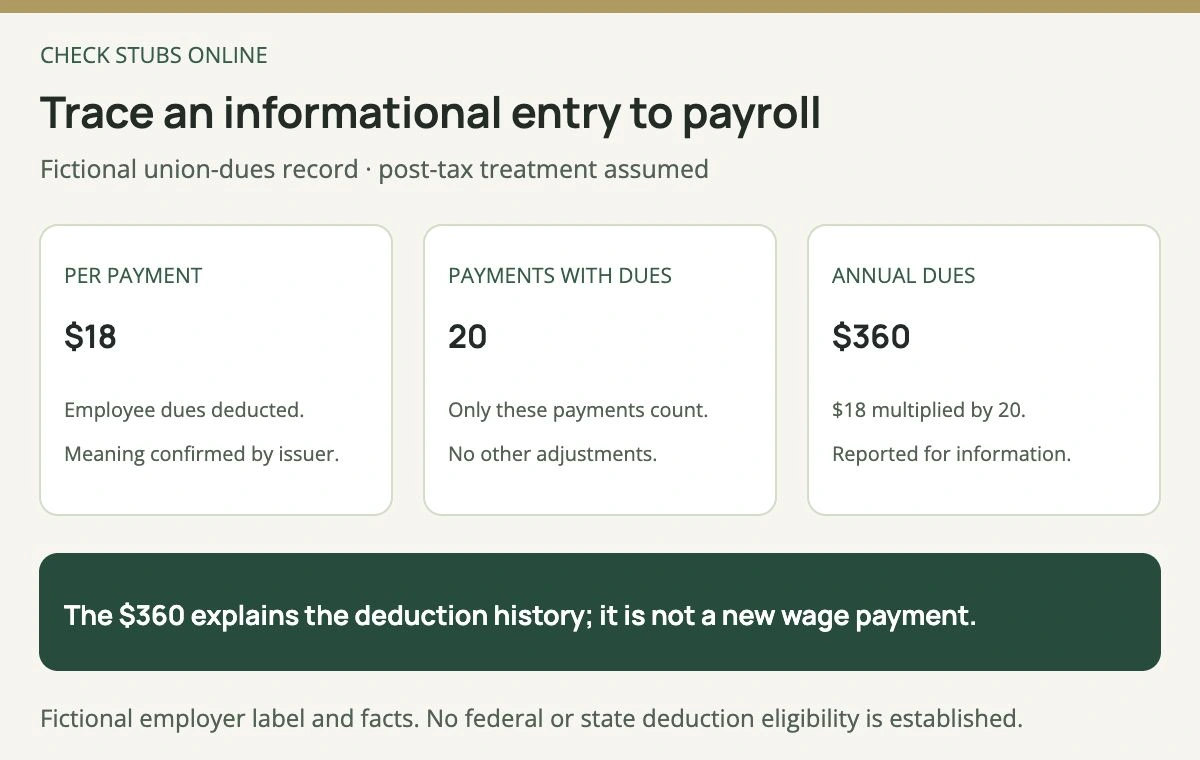
The employer’s explanation and the deduction ledger establish the assumed meaning. This worksheet does not decide whether the worker can claim any tax deduction.
If the form instead shows $396, the difference is $36, equal to two additional $18 deductions in this hypothetical arithmetic. That is a question to investigate, not proof of the cause. There could be different deduction dates, a retroactive adjustment or an error.
Ask for the payment-level detail supporting the issuer’s amount. Check whether the final statement already includes an adjustment before adding another entry. A cumulative YTD figure should not be added to every earlier cumulative figure; our [YTD reconciliation guide](https://blog.checkstubsonline.com/ytd-gross-pay) explains that issue.
## An informational amount is not automatically another wage payment
Assume the same fictional worker has supported Box 1 wages of $48,000, and the $360 dues were post-tax deductions already accounted for in payroll. The informational entry does not represent another $360 paid as wages.
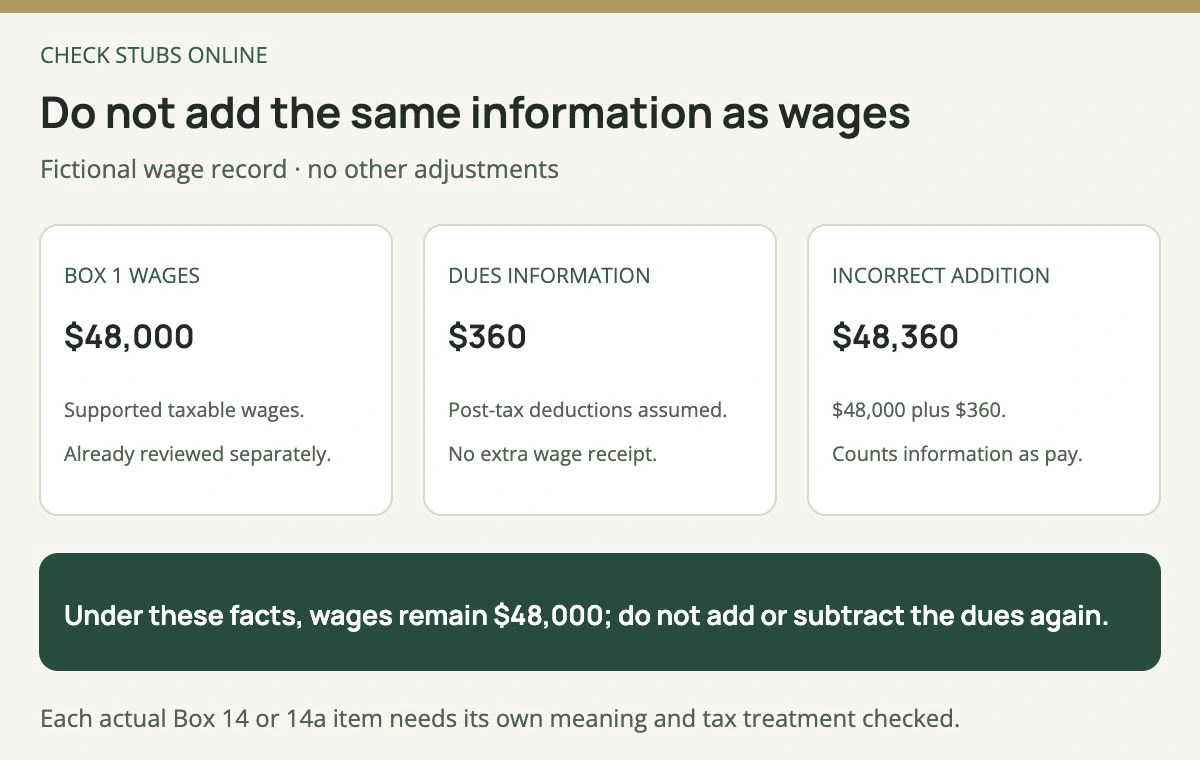
This result follows the stated post-tax dues facts. It is not a universal instruction to disregard all Other entries or to apply the same treatment to different benefits.
Adding $360 to $48,000 would produce an unsupported $48,360 wage total. Subtracting the dues again to create $47,640 would also be an unsupported adjustment to the already established Box 1 figure in this example.
This is a record-classification check, not a statement that every informational benefit is excluded from wages. Some items may already be reflected in another reported field. Determine the actual treatment before making an adjustment, and do not assume that information printed twice means money was paid twice.
The [W-2 wage-box comparison](https://blog.checkstubsonline.com/w2-boxes-1-3-5-different) explains why different tax bases can legitimately differ. The Other area is not a shortcut for rebuilding all those bases from scratch.
## Use the correct year and the supported category in tax software
Enter the document for its actual year and read the software’s current guidance for the identified item. If it asks for an Other category, use the employer’s explanation and applicable return instructions. Do not select a state disability or retirement category simply to make an unfamiliar label disappear.
Some entries may be relevant to a state return or another specific review even when they do not create an additional federal wage amount. Keep the jurisdiction attached to the record. This article does not determine any state deduction, exclusion or credit.
For a 2026 tipped-occupation field, consult the current official instructions instead of treating it as an ordinary Other amount. An occupation code alone does not establish that all tips qualify for a federal deduction or calculate the deduction. Eligibility and the complete return require their own review.
If the software’s field names do not match the form year, pause and confirm that you are using the correct product edition and document type. A layout mismatch is different from an incorrect issuer amount; resolve which problem you have before changing any information.
## Clarification and correction are separate outcomes
Payroll may explain a correct entry without issuing a new form. Retain that explanation and any ledger supporting it. If the label or amount is actually wrong, ask the issuer which correction procedure applies and whether other wage or tax fields are affected.
Do not manually edit the employer’s original PDF and present it as an issuer correction. Our [W-2 reissue versus W-2c guide](https://blog.checkstubsonline.com/reissued-w2-vs-w2c) explains the distinction between another copy and changed reporting. If the correction arrives after filing, compare it with the filed return rather than automatically assuming the tax changed.
Keep versions clearly named so an old copy is not imported beside its replacement. The [annual reconciliation guide](https://blog.checkstubsonline.com/year-end-pay-stub-vs-w2) can help organize the supporting wage history while preserving the original payment dates.
## The live builder’s edition must match the document year
The [Check Stubs Online W-2 builder](https://www.checkstubsonline.com/forms/w2/create), reviewed November 18, 2026, currently offers the 2025 edition. Its Other section allows up to three short entries. That is not evidence that the tool currently prepares the new 2026 Box 14a/14b layout.
Use accurate employer-authorized records for the supported edition and inspect the complete preview. The tool does not determine an unfamiliar label’s tax meaning, retrieve the issuer’s original forms or file a government correction. The [2025 preparation guide](https://blog.checkstubsonline.com/w2-generator-2025-guide) explains the tool’s scope.
## Box 14 questions
### Is every Other amount additional taxable income?
No. Identify the item and determine whether and how it is already reflected in the supported wage reporting.
### Can I claim every amount as a deduction?
No. A label and amount do not establish eligibility under federal or state return rules.
### Why does a 2026 form show two Box 14 fields?
The revised form separates Other information in 14a from the tipped-occupation field in 14b.
### Should I guess a payroll abbreviation from another company’s website?
Ask the actual issuer to confirm its meaning and retain that explanation.
The Check Stubs Online Editorial Team reviewed both official W-2 editions, current field instructions and the live builder, and independently checked the fictional dues ledger.
## Relevant document tool
Prepare supported 2025 W-2 information
Confirm each Other label with the employer and reconcile its amount before preparing the document.
[Review the 2025 W-2 builder](https://www.checkstubsonline.com/forms/w2/create)
The reviewed builder offers 2025. It does not currently establish support for the revised 2026 layout, decide tax treatment or file a government return or correction.
## Related guides
- [Reissued W-2 vs. W-2c: Duplicate Copies and Corrected Amounts](https://blog.checkstubsonline.com/reissued-w2-vs-w2c)
- [W-2 Box 12 Codes D, AA, DD and W: Meaning and Examples](https://blog.checkstubsonline.com/w2-box-12-codes-d-aa-dd-w)
- [Why W-2 Boxes 1, 3 and 5 Are Different: Wage Examples](https://blog.checkstubsonline.com/w2-boxes-1-3-5-different)